Interactive Music Production
Follow @musicproducerlab

You just heard the science. Now learn the craft.

Interactive labs where you build real tracks step by step. You program drums, layer sounds, balance your mix. Not passive tutorials β€” hands-on practice.

Build your first 4-bar loop in under 8 minutes.

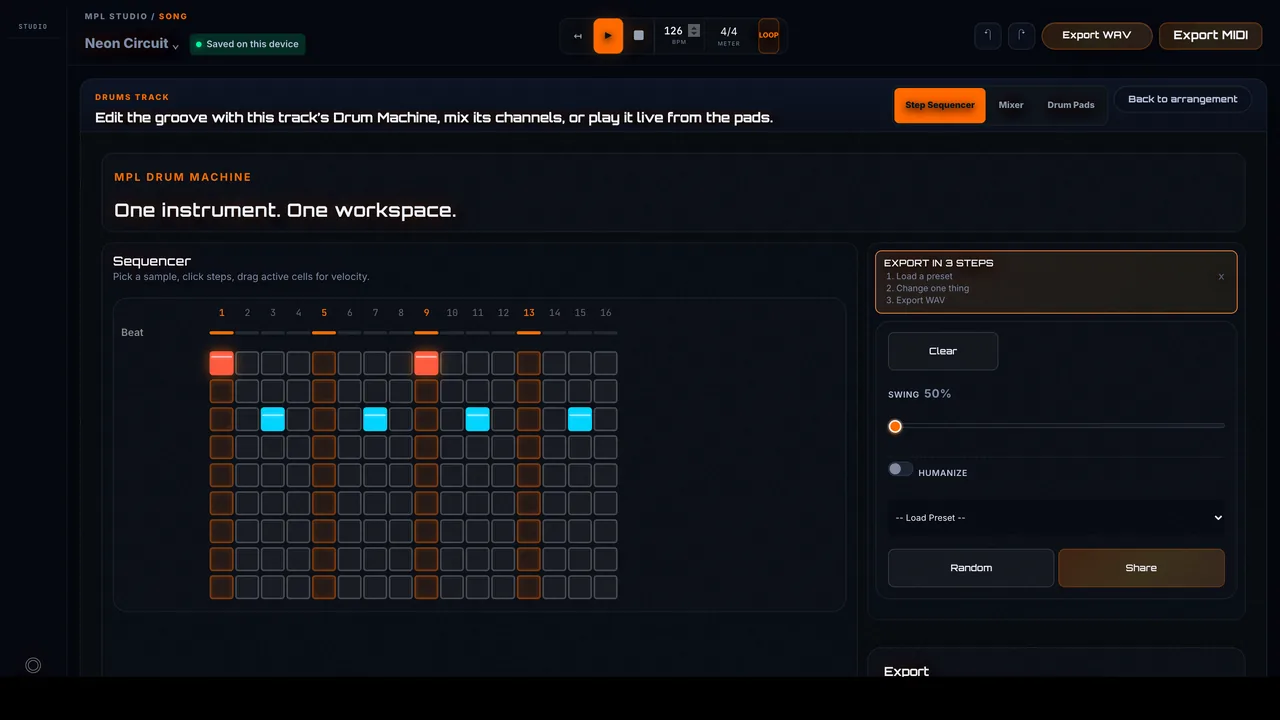
Start with Drum Playground: a 16-step sequencer, royalty-free samples, instant playback, and export to WAV or MIDI for your DAW.

174
Lessons
20+
Interactive Labs
<30min
To First Beat
Any DAW
Compatible
Scroll to explore

πŸ‘‹ Hey, welcome from Instagram

That was just a taste.

Inside MPL you get 174 interactive lessons on drums, mixing, sound design, music theory β€” all hands-on. No passive watching. No fluff.

Start Free β€” No Card Required Follow @musicproducerlab
Taught at ICMP London Β· Abbey Road Institute Β· The BRIT School Β· Point Blank Β· Garnish Β· Ableton Certified Trainer
See MPL in motion

Watch the workflow before you start.

A fast look at how Music Producer Lab teaches through doing: drums, synths, sequencing, guided lessons, and real browser-based practice that gets you making music quickly.

Why Music Producer Lab is Different

You'll finish real tracks, not just collect information.

watching
tabsnotesstalled

Passive Tutorials

You watch hours of videos, take notes, but when you open your DAW... blank screen. Watching builds knowledge. Doing builds skill. Our labs focus on muscle memory, not just concepts.

theory
detachedabstractlate

Theory Without Context

Learning EQ curves before you've mixed a track is like reading about swimming before touching water. We introduce theory when you need it β€” right when you're placing that kick or balancing that bass.

practice
aloneunclearlooping

No Guided Practice

They give you information but leave you alone. "Now go and practice" - but practice what? Without structured guidance, you end up going in circles.

overload
noiseno orderfatigue

Tutorial Overload

200 YouTube tabs. 15 half-watched courses. Still no finished tracks. The problem isn't motivation β€” it's lack of structure. Our labs give you a clear sequence with measurable progress.

Here's the difference: you'll actually finish tracks.

Each lab takes 8-15 minutes and results in a complete musical element β€” a drum pattern, a bassline, a mixed section. No 3-hour tutorials. No vague homework. Just concrete, cumulative progress.

Start Free Labs
Core Modules

Six production pillars, from rhythm to final master

Each module covers specific, testable skills: kick placement, sidechain compression, stereo width, loudness targets. Build your foundation, then layer in advanced techniques.

Drums & Rhythm

Program 4-on-the-floor patterns, offbeat hi-hats, and ghost snares. Learn swing timing, velocity layering, and rhythmic fills that drive energy.

Build Your First Beat (8 min)

Arrangement

Structure 8-bar intros, 16-bar buildups, and dynamic drops. Practice filtering, automation curves, and tension/release arcs for electronic and pop formats.

Structure a Full Track (12 min)

Sound Design

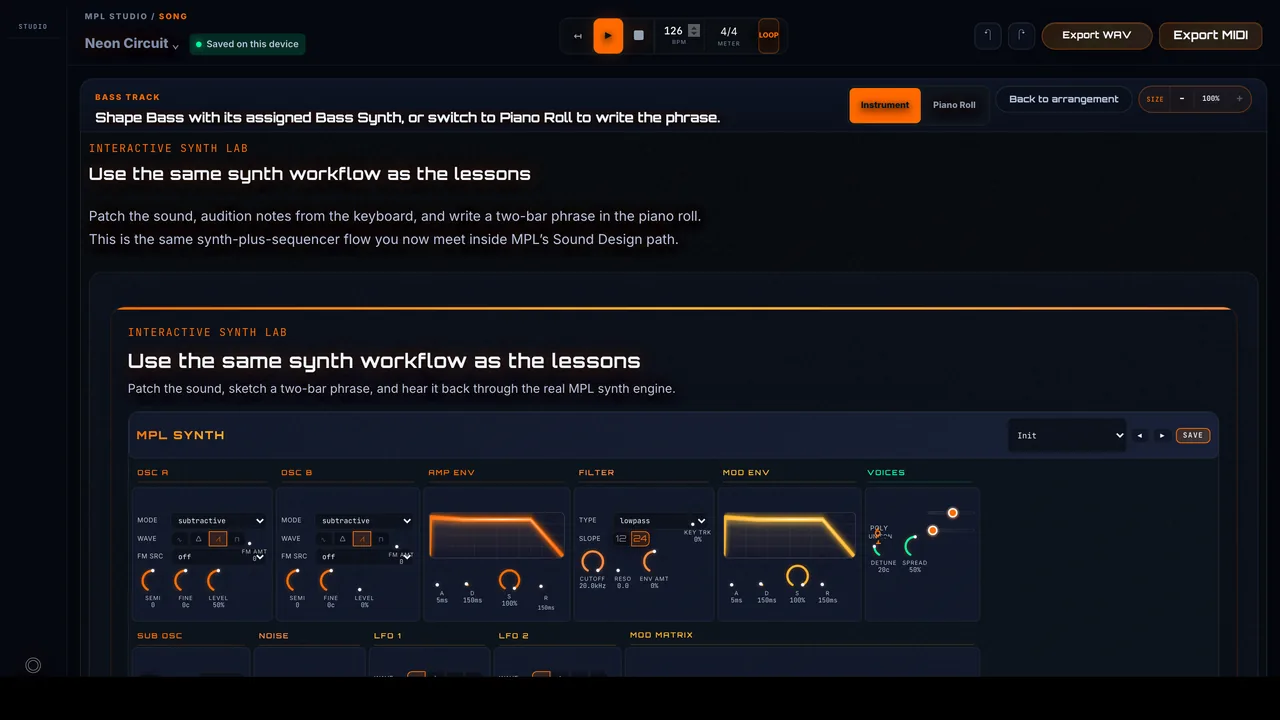
Shape sounds with oscillators, filters (low-pass, high-pass), ADSR envelopes, and LFOs. Layer samples, add distortion, and design bass, leads, and pads from scratch.

Design Your First Synth (10 min)

Mixing

Balance levels, carve space with EQ (cutting mud at 250-500Hz, narrow Q, preserve warmth below 250Hz), apply compression ratios (4:1 for drums), and place elements in stereo field with panning and reverb sends.

Mix a Clean Balance (15 min)

Vocals

De-ess harsh frequencies, compress dynamics (4-8dB typical; 10-15dB total in serial compression), add doubles and harmonies, apply delay/reverb for depth. Make vocals clear and present without overpowering the mix.

Process a Vocal Track (12 min)

Mastering

Hit -14 LUFS for Spotify, apply multiband compression, stereo widening (keep bass mono), and peak limiting (-0.3 dBTP true-peak ceiling, or -1 dBTP for safety). Prepare tracks for streaming and distribution.

Master for Streaming (10 min)
Platform Preview

See the platform in action

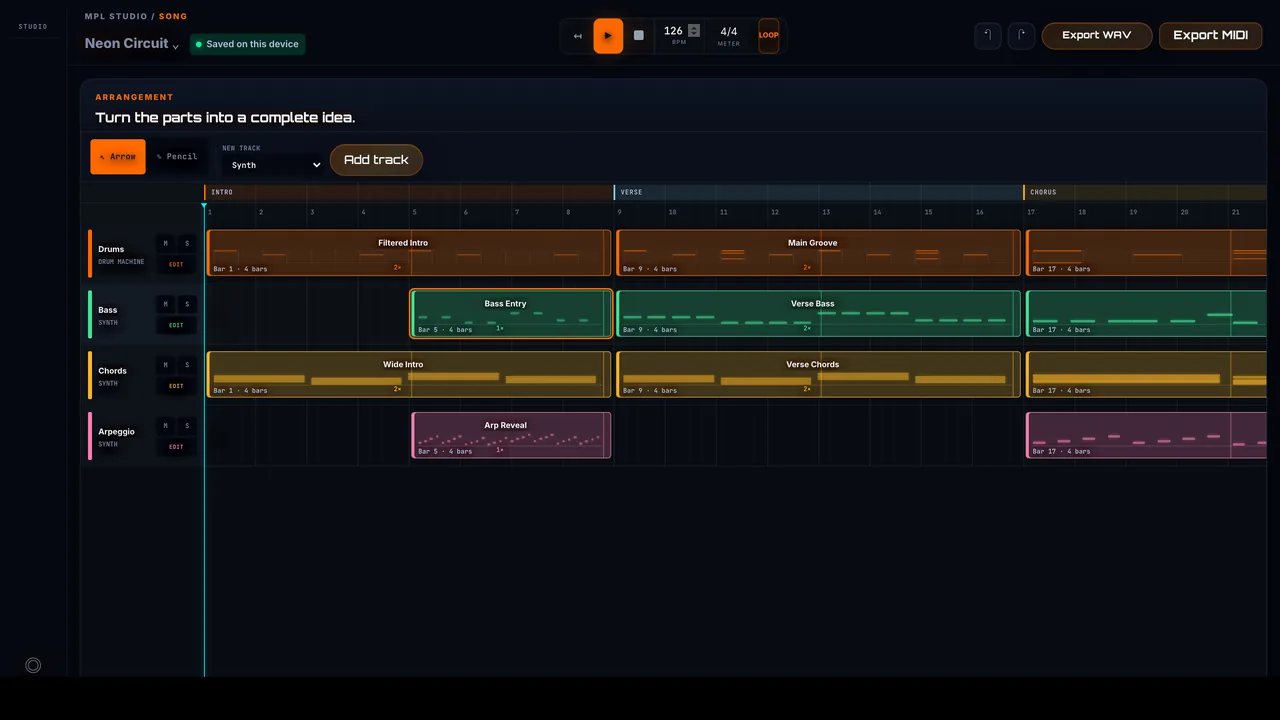
Interactive drum sequencers, piano rolls, and mixing consoles β€” all in your browser. No installation, no configuration. Just open and create.

16-Step Drum Sequencer

Program beats with our intuitive step sequencer. Place kicks, snares, and hi-hats on a 16-step grid. Hear results instantly, adjust velocity, and export to your DAW.

Try Drum Playground

Piano Roll & Melodies

Create melodies and basslines with our piano roll editor. Draw notes, adjust lengths, and experiment with different scales. Perfect for learning music theory through practice.

Explore Harmony Labs

Synth Playground

Practice oscillator, filter, envelope, and modulation concepts on an interactive step grid built for Sound Design exercises.

Try Synth Playground
Real-time
Instant audio feedback
Browser-based
No installation needed
Export
WAV & MIDI files

Every lab includes interactive controls you manipulate directly. No passive watching β€” you shape the sound yourself.

Start Creating Now
How It Works

From first click to finished track in 3 steps

You'll make mistakes. You'll tweak knobs that don't sound right. That's exactly how you learn β€” through immediate feedback, not guesswork.

1
Choose Lab
2
Follow & Experiment
3
Apply to DAW
01

Choose a Lab and Start

Open a free lab (Drums, Arrangement, Sound Design...). Each lab takes you through completing a real track in 10-15 minutes. Not abstract theory - real music.

Drums
Harmony
Mixing
β†’ Click any category to start immediately
  • Interactive interface right in the browser
  • No installation required
  • Work directly with professional sounds
02

Follow the Step-by-Step Guide

Each lab gives you clear instructions: "Place kick on beat 1 and 3", "Try compression ratio 4:1, listen, adjust". You'll experiment, compare, and build ear training β€” not just follow blindly.

1
Place kick drum on beat 1 & 3
2
Add snare on beat 2 & 4
3
Layer hi-hats on every 8th note
Hear ItListen after each step β€’ Compare variations β€’ Build intuition
  • Structured exercises with room to experiment
  • Context for each decision (not just "do this")
  • Instant audio feedback on every change
03

Apply to Your DAW

Finished a lab? Now recreate it in your DAW. The interface looks different, but the concepts are identical: kick placement, EQ cuts, automation shapes. This repetition is where real skill lives.

MPL Lab
Learn concept
β†’
Your DAW
Apply technique
Works with: Ableton β€’ FL Studio β€’ Logic Pro β€’ Bitwig β€’ Reaper β€’ Any DAW
  • DAW-agnostic techniques (Ableton, FL, Logic, Bitwig, etc.)
  • Muscle memory through deliberate repetition
  • Faster progress than scattered YouTube tutorials

174 lessons + 20+ interactive labs await you. Start free, no card required.

Open Free Labs
Why MPL

A lab, not a lecture.

Each module takes you into a guided lab where you trigger sounds, adjust controls, and shape a track in real time. Instead of watching someone else produce, you build the song yourself with clear instructions that explain why every move matters.

  • Short, focused labs that fit your schedule
  • Immediate feedback while you experiment
  • Concept-based teaching: learn the why, not just the what
  • DAW-independent skills usable anywhere
Interactive Session 01/20

Beat Foundation Lab

Assemble your first electronic beat with kick, snare, and hi-hat.

Time
8-12 min
Level
Beginner
Skills
Rhythm, Groove
Start This Lab
Choose Your Path

For Schools & For Individuals

Whether you're an educator looking for curriculum or an individual exploring music production, we've got you covered.

Built for Education

Privacy & School Governance

Designed for K-12 workflows with minimal student data, no third-party ads, and school-managed access controls. Institutions can request our privacy package (policy, DPA summary, security commitments) during onboarding and pilot setup. Formal legal validation for institution-specific COPPA/GDPR claims is completed during contract phase. See our Privacy Policy for details.

Classroom Management

View class-linked learner activity, monitor lesson completion, and export CSV summaries for enrolled students. Simple dashboard for educators.

Browser-Based Platform

Zero installation. Works on Chromebooks, iPads, PCs, and Macs. Just open a browser.

School Rollout Support

Pilot setup, account provisioning, and rollout planning are scoped manually with each institution. Integrations are discussed during discovery, not promised as live by default.

School Pricing

Conversation-First Access

We scope pilots and rollouts with your school instead of forcing a generic public price list

  • Pilot one class before scaling wider
  • Scope onboarding around your teacher count and student volume
  • Review privacy, support, and rollout needs during discovery
  • No rigid checkout flow for schools
View School Plans

What's Included

  • β†’ All 174 lessons + 20+ interactive labs
  • β†’ Teacher dashboard with class-linked learner activity
  • β†’ CSV exports for learner activity review
  • β†’ Priority email support
  • β†’ Curriculum guides & lesson plans
Who It's For

Music Producer Lab is for you if...

It doesn't matter if you're a beginner or already experimenting - if you want to make music instead of just studying it, you're in the right place.

Absolute Beginners

Never opened a DAW? Good starting point. Labs introduce concepts through doing β€” you'll build a simple 4-bar loop before learning what "MIDI" or "quantize" officially mean.

β†’ First complete loop in <30 minutes

Frustrated Self-Taught

Watched 100+ tutorials but can't finish a beat? You need structure, not more random content. Labs give you a clear path.

β†’ Finally finish what you start

Intermediate Producers

Know how to make beats but want to refine mixing, mastering, arrangement? Advanced labs teach you pro techniques with immediate practical examples.

β†’ Take your tracks to professional level

Music Producer Lab is NOT for you if...

You just want to watch videos - Labs require active interaction. If you're not willing to put your hands on the keyboard, this isn't for you.

You're looking for magic shortcuts - There's no "pro secret". You need guided practice. Labs make it efficient, but you have to do it.

Ready to go from theory to practice?

Choose your first lab and start producing real music. Free to start. Create an account to save progress and unlock the guided lesson path.

Start Labs Now
DAW Independent

Learn once, apply everywhere.

Everything you learn translates directly to Ableton Live, FL Studio, Logic Pro, Bitwig, or any other DAW. We teach production fundamentals, not software tricks.

Ableton Live
FL Studio
Logic Pro
Bitwig
& More
Concrete Results

What you'll get with Music Producer Lab

No vague promises - here's exactly what you'll be able to do after our labs.

After 1 Week

Build your first repeatable loop

Early progress is concrete. You stop guessing and start finishing small musical blocks on purpose.

  • You've completed your first working beat with kick, snare, hats, and bass.
  • You understand how a DAW works and the interface stops feeling intimidating.
  • You can count bars and program rhythms in time without losing the loop.
After 1 Month

Move from loops to real tracks

You’re no longer just experimenting. You’re building arrangements, balancing parts, and finishing pieces you can actually share.

  • You've produced 5 to 10 complete tracks with intros, builds, drops, and outros.
  • You know how to mix basic elements using volume, pan, EQ, and compression.
  • You have a listenable portfolio ready for friends, collaborators, or socials.
After 3 Months

Work with a real release mindset

By this point the system is compounding. Your process feels repeatable, and your mixes stop sounding accidental.

  • You produce streaming-ready tracks with cleaner arrangement, balance, and loudness.
  • You apply core mixing and mastering so the result sounds intentional, not amateur.
  • You build consistent workflow habits and start recognizing your own sound.
Bonus Skills

The side effects are worth it too

You’re not only learning workflows. You’re building instincts that keep paying off every time you open a session.

  • A more trained ear for frequencies, balance, and dynamics.
  • A personal sound library that’s organized and ready to use.
  • More creative confidence when you sit down in front of a blank page.

The commitment: if you complete the labs and apply them, you will finish tracks.

Not because of magic, but because of structured repetition. Each lab builds on the last. Each skill compounds. Will your first track be Grammy-worthy? No. Will it be complete, listenable, and yours? Absolutely.

FAQ

Frequently Asked Questions

Everything you need to know before you start.

How much does Music Producer Lab cost?

The basic labs are free to start. No credit card required for free access. Create a free account to save progress and unlock the guided lesson path. Advanced labs require a premium plan.

Do I need a specific DAW?

No. Labs work in the browser - no installation needed. When you apply the skills to your DAW, the concepts work with Ableton, FL Studio, Logic, Bitwig, Reaper, any software. We teach universal principles, not program-specific tricks.

How long does it take to complete a lab?

Each lab takes 10-15 minutes on average. Some shorter (5 min), others longer (20 min). They're designed to be completed in a coffee break. You can do one lab a day or 5 in an afternoon - you set the pace.

Do I need to know music theory?

No. You don't need to read sheet music or know scales. We teach you what you need when you need it. If you need to program a bassline, we explain the right notes at that moment - learning by doing. Theory comes later, if you want to dive deeper.

Can I use the tracks I create in the labs?

Yes! Everything you produce in the labs is yours. You can publish it, remix it, use it as a foundation for bigger projects. The sounds provided in the labs are royalty-free for personal and commercial use.

Are there any age limitations?

There are no age limitations. Music production is for everyone - whether you're starting at 12 or 70. All you need is curiosity and willingness to experiment.

How is this different from YouTube tutorials?

YouTube teaches you concepts. Labs make you do the work. Instead of watching someone EQ a kick drum, you adjust the frequency knob yourself, hear the difference, make mistakes, and correct them. Active practice beats passive watching β€” that's proven learning science, not marketing.

What skills actually transfer to my DAW?

Everything fundamental: rhythm programming, gain staging, EQ frequency zones, compression ratios, reverb send levels, arrangement structure. DAWs have different interfaces but identical concepts. Once you understand "cut 200Hz to remove mud," you can do that in any software. Think of labs as flight simulators β€” different controls, same principles.

Why do interactive labs work better than courses?

Because you can't fake doing. In a video course, you can watch 10 hours and feel productive without building anything. Labs force output: every session ends with something you made. That immediate feedback loop (try β†’ hear β†’ adjust β†’ improve) builds skill faster than any amount of note-taking. Plus, you can't fall behind β€” work at your own pace.

More questions? Contact us β†’

Your first lab is waiting.

No signup. No installation. Just open a lab and start building. You'll have something to show in 8 minutes.
Start Free Labs Now Get Premium β€” $9/mo